How it works Inside the app Getting started Pricing FAQ Talk to us on WhatsApp
Built for FBR digital invoicing

Every invoice, verified by FBR - before it reaches your buyer.

munshi is the invoicing desk app that keeps your business on the right side of FBR's e-invoicing mandate. Add your buyers, add your items with the correct HS codes, and issue invoices that post straight to FBR - one at a time, or a hundred at a time.

1Payment. Ever.
Invoices, buyers & items
0Setup work for you
Posting to FBR
3310049652…A714750 SALWA INDUSTRIES Rs. 778,794 Posted
7560282DI0…J173446 ABC CORP Rs. 1,170 Posted
9013701IR0…K948633 NAZAR TRADERS Rs. 55,000 Posted
5556471DI0…HAZ173 IRC DAIRY PRODUCTS Rs. 12,400 Posted
47 invoices · 96% submission rate Rs. 2.1M total
Why this can't wait

FBR compliance stopped being optional in 2026.

Enforcement is live. Registered businesses that haven't integrated with FBR's e-invoicing system are already being penalised - and the exposure isn't only financial.

Rs. 500K–3M
Penalty range under the Sales Tax Act, 1990 for registered persons who fail to integrate or issue invoices outside the system.
Live since Jan 2026
FBR began enforcing penalties after integration deadlines under SRO 1852(I)/2025 expired for every taxpayer category.
No input tax
Invoices issued outside FBR's system aren't valid for input tax adjustment - for you or for the buyer on the other end.
Closer audits
FBR cross-checks buyers and sellers automatically. Gaps in your invoice trail get flagged, and enforcement capacity is growing.

General information, not tax or legal advice. Penalty amounts and enforcement rules can change - confirm your specific obligations with FBR or a qualified tax advisor.

How it works

Four screens. That's the whole workflow.

No accounting jargon, no hidden menus. munshi follows the order your invoicing already happens in.

01

Add your buyers

Build your customer database once - name, NTN or CNIC, province, and FBR registration status. munshi tracks who's registered and who isn't, automatically.

SA SALWA INDUSTRIES Registered
AB ABC Corp Unregistered
NA Nazar Traders Registered
02

Add items with the right HS code

Every product gets the correct HS code and tax rate attached, so it's carried onto every invoice automatically - no looking it up twice.

Cotton Yarn - 40s Count5205.23
Packaged Milk, 1L0401.20
Dairy Blend Powder0402.21
03

Generate the invoice

Pick a buyer, pick the items, and issue. The invoice is posted to FBR in real time and comes back with its own FBR invoice number - ready to send.

Post to FBR →
04

Or generate a hundred at once

Download the Excel template, fill in a row per invoice, and upload it back. munshi reads the sheet and posts every invoice for you - batch import, built in.

invoices_batch.xlsx

214 rows · reading buyers, items & quantities

Inside the app

A dashboard that answers the only three questions that matter.

What's posted, what's pending, and who owes what. Everything else is one click away.

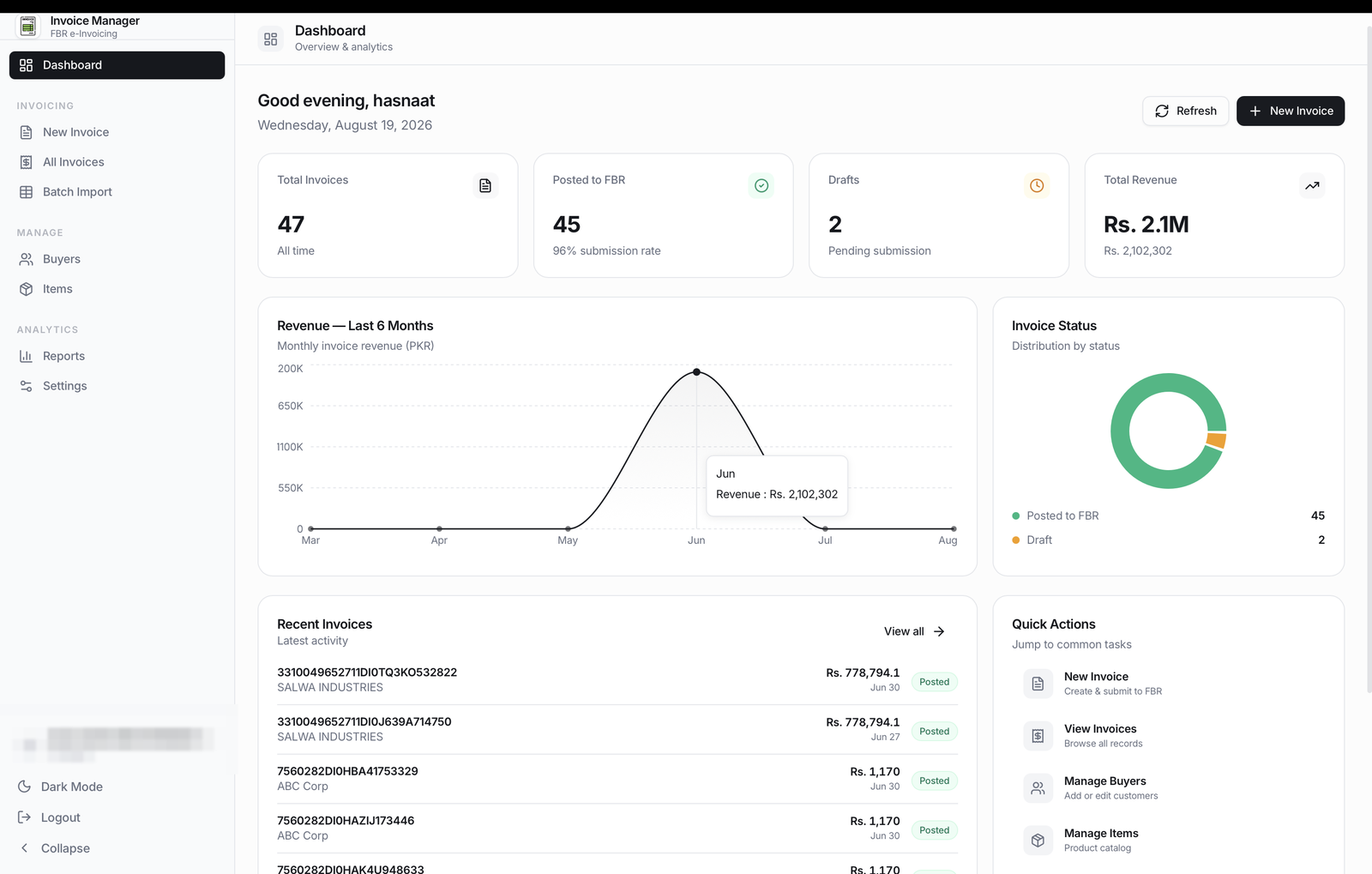
At a glance

Your whole invoicing desk on one screen.

Total invoices, FBR submission rate, drafts waiting to go out, and revenue for the period - the moment you log in.

  • Live submission rate, tracked automatically
  • Revenue trend across the last six months
  • Recent invoices, right below the fold
munshi dashboard showing total invoices, FBR submission rate, drafts and a six-month revenue chart
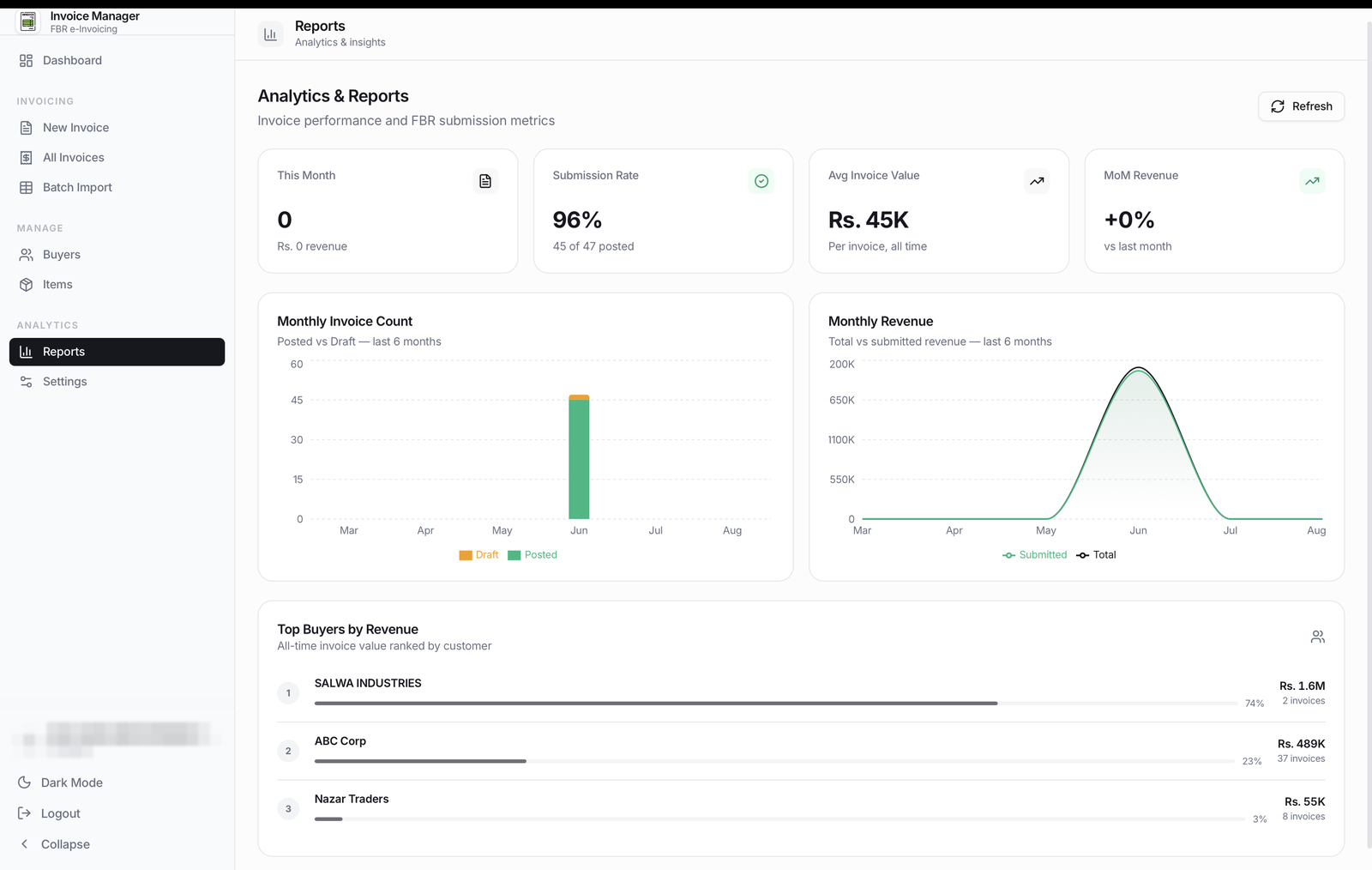
munshi reports screen showing monthly invoice count, monthly revenue and top buyers by revenue
Reports

Know exactly who your revenue depends on.

Submission rate, average invoice value, and a ranked list of your top buyers - the numbers you'd otherwise build a spreadsheet for.

  • Top buyers ranked by all-time revenue
  • Posted vs. draft, broken down by month
  • Month-over-month revenue at a glance
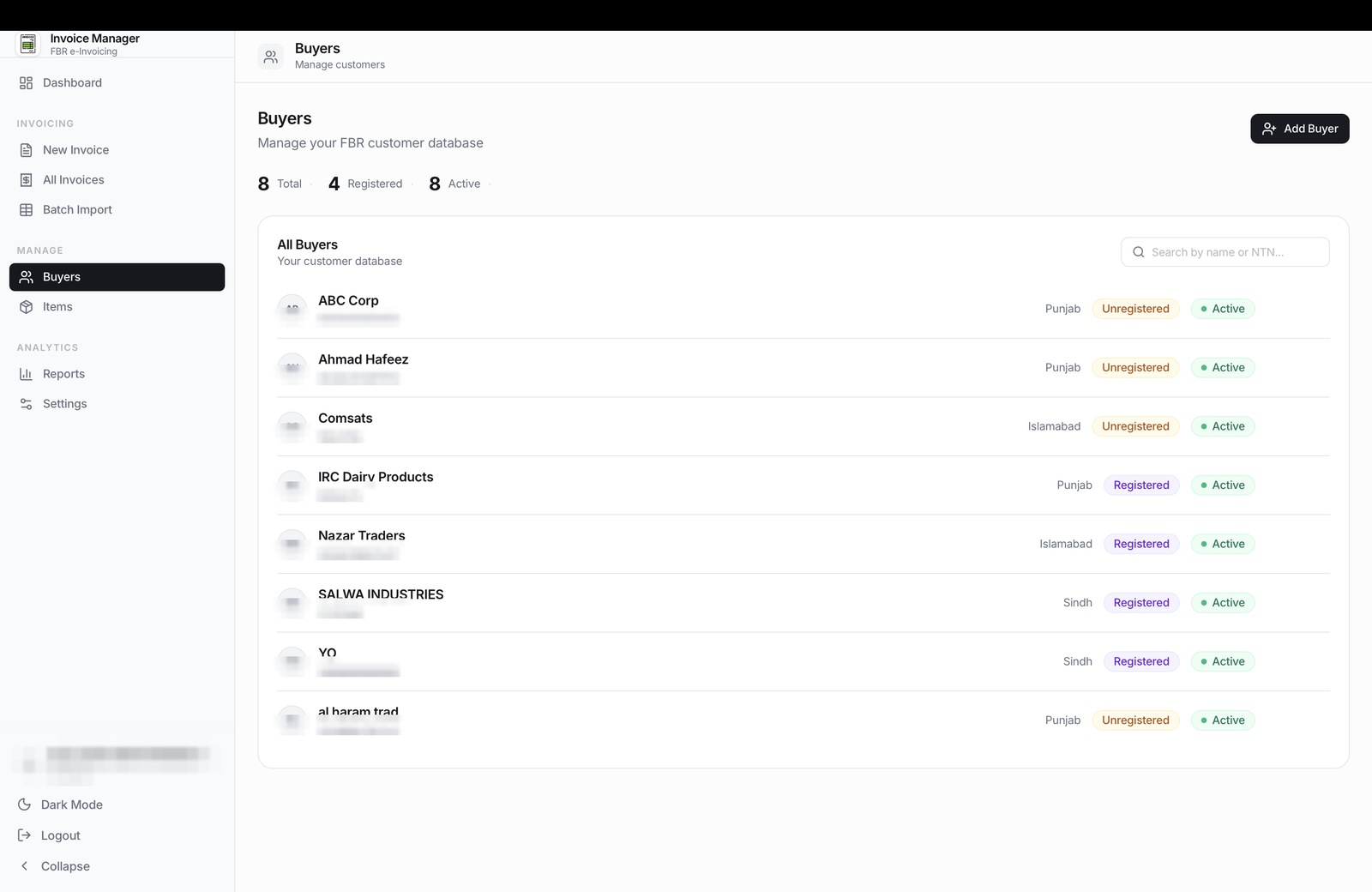
Buyers

A customer database that knows who's FBR-registered.

Search by name or NTN, see registration status at a glance, and keep every buyer's details ready before the next invoice.

  • Unlimited buyers, no extra cost
  • Registration status tracked per buyer
  • Search by name or NTN in a click
munshi buyers screen listing customers with province, registration status and active status
Getting started

You don't set anything up. We do.

There's no install guide to follow and nothing technical on your end. Share access, and we handle the rest - start to finish, with guidance at every step.

Start on WhatsApp

Share your IRIS credentials

Sent to us securely, used only to complete your FBR e-invoicing setup - nothing more.

Install AnyDesk on your PC

One free download. It's the only thing you need to install - we walk you through it if you're unsure.

We set everything up remotely

munshi is installed, connected, and configured for your business while you watch - or step away and come back.

Guidance, then ongoing support

We explain every screen before we leave, and stay reachable on WhatsApp for feedback or issues after.

Pricing

Pay once. Invoice forever.

No monthly fee, no per-invoice charge, no surprise renewal. Set up once and it's yours.

Everything, for a single payment

Unlimited invoices, unlimited buyers, unlimited items - from day one, with no recurring cost attached to any of it.

  • Unlimited FBR invoices
  • Unlimited buyers & items
  • Batch invoicing via Excel
  • Full remote setup, done for you
  • Reports & dashboard included
  • Free support & feedback, always
One-time payment
No subscriptionever
No monthly fee · no per-invoice fee
Get pricing on WhatsApp

Reply with your business size and we'll quote you directly - no forms, no waiting.

Questions

Everything you'd ask before switching.

FBR e-invoicing is the requirement for sales-tax-registered businesses to report their invoices to FBR's system in real time and issue invoices carrying a valid FBR invoice number. It now applies broadly across categories and sectors, with integration deadlines already passed for most registered persons. If you issue sales tax invoices, it almost certainly applies to you - tell us your business type on WhatsApp and we'll confirm.
FBR has been actively imposing penalties since January 2026 on businesses that haven't integrated. Penalties for non-compliant registered persons can run from roughly Rs. 500,000 up to Rs. 3,000,000, invoices issued outside the system aren't valid for input tax adjustment, and non-compliant businesses draw closer audit attention. This is general information, not tax advice - your exact exposure depends on your registration category.
No. You don't install, configure, or connect anything yourself. You share your IRIS credentials with us and install one free remote-access app (AnyDesk) on your computer - we do everything else and walk you through every screen before we hand it back to you.
You download a ready-made Excel template from inside the app, fill in one row per invoice with your buyer and item details, and upload the sheet back. munshi reads every row and generates the invoices for you automatically - no retyping, no re-entering the same buyer twice.
Correct - it's a single, one-time payment. No subscription, no recurring licence fee, no per-invoice charge, and no limit on how many invoices, buyers, or items you add. You pay once and the app is yours to run.
We stay available on WhatsApp for feedback, questions, or anything that comes up - before and after you're set up. If an issue occurs, message us and we'll sort it out.
Your credentials are used only to complete your e-invoicing setup and connect your business to FBR's system - never shared or reused elsewhere. munshi is an independent software provider; we are not FBR or PRAL, and we'll always be upfront about exactly what we're doing with access before we start.

Stop invoicing outside the system.

One conversation on WhatsApp is all it takes to get started - we'll take it from there.

Chat with us